Mulch calculatorFoundation bed quantitiesVertical gap check
Measure · plan · compare
Mulch Foundation Clearance Calculator
Projected gap = measured gap − planned mulch rise. Compare it with a target from your siding instructions or local guidance; no clearance is preselected.
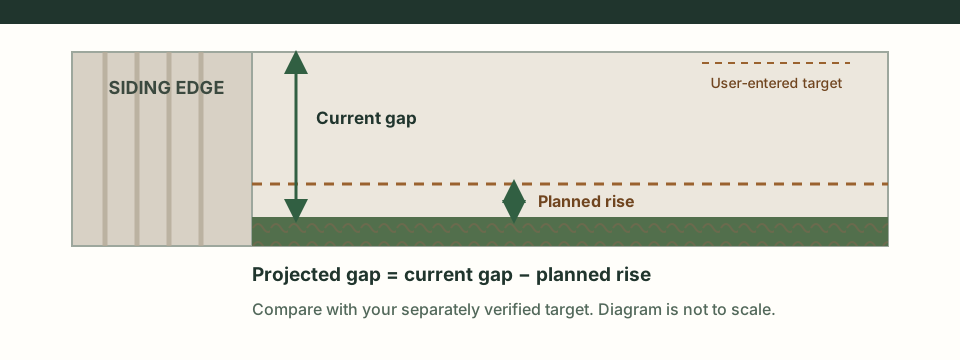
The comparison is a simple height balance
Measure vertically from the current mulch surface to the same siding or cladding reference edge. Estimate the finished surface rise at that exact section. Then compare the projected gap with a target you obtained separately. Do not mix measurements taken from different reference points.
Projected gap = current measured gap − planned surface rise
Margin = projected gap − your entered target
Rise reduction to meet that entered target = max(0, −margin)
Illustrative example, not a recommendation: if a section measures 8 in now, the project raises the surface 2 in, and your separately verified target is 4 in, the arithmetic gives 6 in projected and a +2 in margin. Those numbers demonstrate subtraction only; they do not set a suitable depth or clearance.
If wall sections vary, add a row for each low point or distinct run. The summary highlights the lowest projected gap so a longer, taller stretch does not hide one tighter spot. This is not a survey of the wall and does not account for settling, slope, drainage, trim, vents, openings or hidden layers.
Bring the target from the right source
There is no universal number in this calculator. Check the instructions for the exact siding or cladding product and any applicable local building guidance. Extension guidance for an individual location can be useful context, but it is not a substitute for the requirements that apply to your product and site.
NC State Extension’s termite-prevention guidance discusses keeping mulch from contacting a home's foundation or lowest siding. It is location-specific guidance, not a universal clearance specification. This worksheet does not assess termite risk or certify a wall.
Need to estimate the material order after deciding what area to cover? Use the foundation-bed mulch quantity calculator for horizontal area, depth and bag or bulk quantities. It solves a different measurement problem.
Foundation clearance questions
How does the projected gap calculation work?
For each section, projected gap = current measured gap − planned rise. Margin = projected gap − the target you entered. A negative margin shows how far that section falls below your entered target; it is not a safety verdict.
Where should I get the target clearance?
Use the instructions for your exact siding or cladding product and any applicable local building guidance. This calculator supplies no default clearance, code interpretation or universal recommendation.
What does a negative projected gap mean?
It means the planned rise is greater than the current measured gap for that section, based on your inputs. Recheck the reference points and plan before applying material; the result does not inspect the wall or site.
Does meeting my target prove the installation is safe or code-compliant?
No. The worksheet only compares measurements you provide. It cannot verify product instructions, local code, drainage, pests, openings, hidden conditions or installation safety.
Sources and limits
- NC State Extension, “Termites: Preventing Problems in Existing Homes.” Location-specific educational guidance; it does not establish the target for every siding product or jurisdiction.
- James Hardie HardiePlank installation instructions. Product documentation is one example of why the user should consult the exact installed product instructions; this worksheet does not extract a clearance from that document.
The calculator implements only subtraction and comparison of user-supplied measurements. It does not read a photo, identify siding, choose a requirement, recommend mulch depth, inspect the property or replace qualified local guidance.