Confirmed garden brief
Refresh the mulch and edge. Retain the house wall, path, bed outline and existing shrubs.
Source: written brief reviewed by the userTHE LANDSCAPE WORKBENCH / VISUAL IDEAS
Preview one garden bed, review the result, then measure the materials yourself. If you choose the direction, carry the same brief into a shopping list, local costs and a project record.
Limited free previews No account required
CHOOSE THE SPACE YOU WANT TO SEE
Use this photo-based preview to explore one planting bed before ordering materials. Choose a mulch and edge refresh or a bed redesign, then verify the site and measurements yourself.
Checking whether image generation is available…
YOUR WORKING VIEW
Waiting for your photoChoose one clear photo, confirm what should stay, then generate a single concept to review.
No photo is sent until you press Generate.Your garden concept will appear here after generation.
Switching versions uses no credit. Versions stay only in this tab, so download the one you want before leaving.
DECIDE BEFORE USING ANOTHER CREDIT
Saving feedback uses no model request. Another preview uses one more credit and starts from your original photo; it does not edit only one selected part of this image.
The written brief and selected concept are saved locally as a project reference. Your original photo is not retained.
AI concept—not a construction plan or measurement. The model may change structures, plant details or proportions. Check real dimensions, plant suitability and site conditions before buying or building.
SEEDREAM MODEL TEST
Move the control to compare a synthetic test photo with a Seedream output used while validating this workflow. This is a model test, not a completed customer project.
Use your garden photo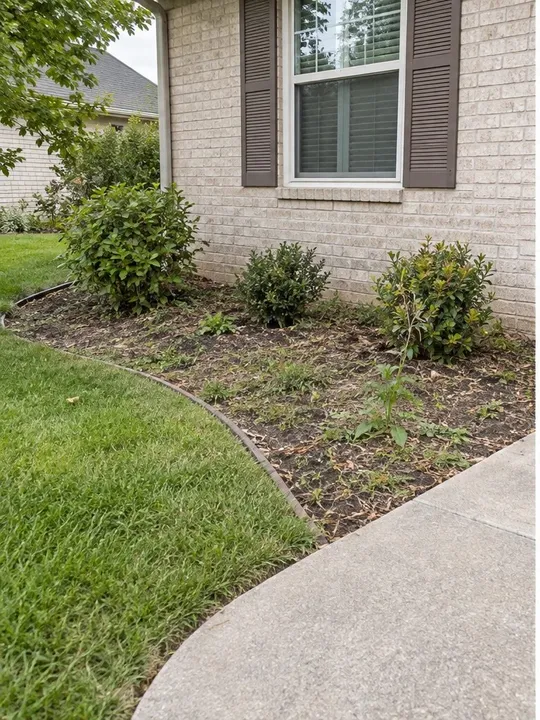
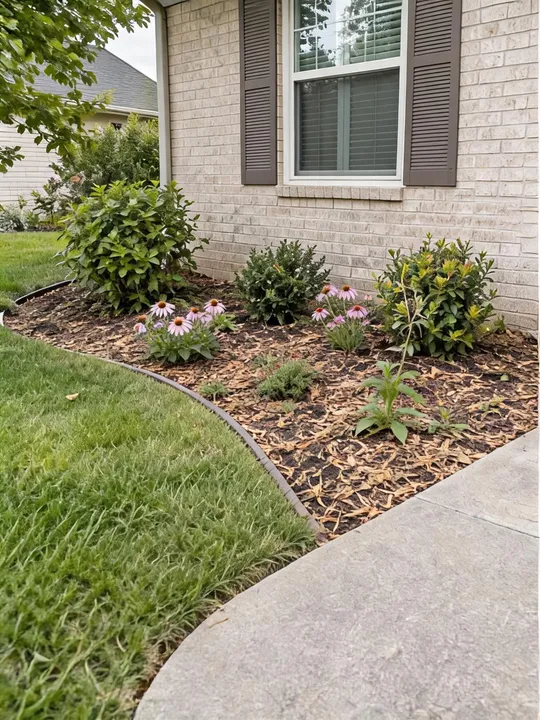
FROM OBSERVATION TO A FINISHED JOB
Define the change before generation, make an explicit decision after it, then carry the same direction into measured areas, ordering and a completion record.
WHAT THE FINISHED RECORD LOOKS LIKE
The visual concept is only one reference. Quantities stay tied to measurements, product choices stay tied to people, and unresolved work stays visibly unresolved.
Refresh the mulch and edge. Retain the house wall, path, bed outline and existing shrubs.
Source: written brief reviewed by the userFront bed: 12.00 ft³
Tree ring: 4.71 ft³
Combined: 16.71 ft³
10 × 2 ft³ bags
or 1.0 yd³ bulk
28 ft steel edging; six low-shrub placeholders; delivery or pickup still unconfirmed.
Source: separate site measurement, human choice and supplier quoteTax, disposal, preparation, plant varieties, utility checks, labor and completion actuals.
Source: entered only after someone confirms themCOVERCALC PRO / CONCEPT PROJECT PACK
AI concept — not a measured construction drawing. Site selections are user observations, not verified growing or drainage advice. Confirm real dimensions, plant suitability, drainage, utilities, access and local requirements before buying or building. Continue in the CoverCalc Pro calculator and planner to add measured quantities, supplier details and the installation checklist.
This tool is an AI landscape preview for one garden bed. It asks the image model to work from your photo’s viewpoint and retain the existing setting. Treat the result as a starting point for a conversation, not a promise that every detail will stay unchanged.
If your decision is about a specific expandable faux-ivy screen, use the expandable ivy privacy screen planner to compare listed sizes, calculate panel count and preview that product class in your space.
The free beta has a daily allowance and a total free-preview allowance. Generation pauses when the total is used up and does not reset automatically. Visitors on a shared network may share their daily allowance. Failed or timed-out attempts count; there is no automatic retry.
Before sending, your photo is resized to a maximum of 1,600 pixels on its longest side and re-encoded as JPEG to remove file metadata. Only Generate sends the photo and instructions for processing.
Current model: Seedream 5.0 Lite. You do not need a Volcano Engine or BytePlus API key to use this limited garden workflow. It is not a general model API. Read our verified guide to Seedream, Qwen Image and other Chinese AI model access.
FROM CONCEPT TO REAL WORK
Yes. Confirm the brief, then copy its model-neutral text. The copied text does not include or upload your photo, so attach the photo separately and review the other service's privacy and usage terms.
CoverCalc Pro offers limited free AI garden previews with no account required. Each generation uses one preview credit, and daily or total allowances can run out; the preview is a visual concept, not a construction plan.
The preview is built for one planting bed. Use a photo of a bed in a backyard or beside a patio; the tool has no separate balcony or container layout. Measure the real space before buying or building.
An AI landscape visualizer turns a photo or sketch into a visual direction for an outdoor space. It can help compare an idea before spending, but it does not verify dimensions, plant suitability, drainage, utilities or construction safety.
The worked pack shows a confirmed brief, measured areas, calculated purchase options, human-selected items, quote checks and unresolved job details. These pieces are assembled through the calculator, cost worksheet and Planner; the AI image does not supply measurements or automatically create the list.
Record every element that must stay in the brief before generating. The model is asked to preserve them, but an AI image can still alter structures, edges or proportions. Compare the concept with your photo before using the direction.
No. The preview explores a visual planting direction and may invent or distort plant details. Confirm species, mature size, sunlight, soil, drainage, climate and local restrictions with reliable local information.
No. Measure the real bed and enter those dimensions in the material calculator. The written brief can travel with you, while quantities continue to come from measurements you provide.
You can download the concept and print its Concept Project Pack as a discussion record. Treat it as a visual direction, then verify the site, quantities, supplier quotes and scope before preparing a customer proposal.