Mulch calculator / Awkward bed sketch
Mulch Grid Area Calculator
For a bed that is too broken-up for one length × width: measure it, draw it to scale, and count the squares that will actually receive mulch.
From your measured sketch
—sq ft estimated area
Enter a real grid scale and your square counts to see an estimate. No measurements are assumed.
—cu ft to add
— cu yd — whole bags
Bag count needs the volume printed on your product.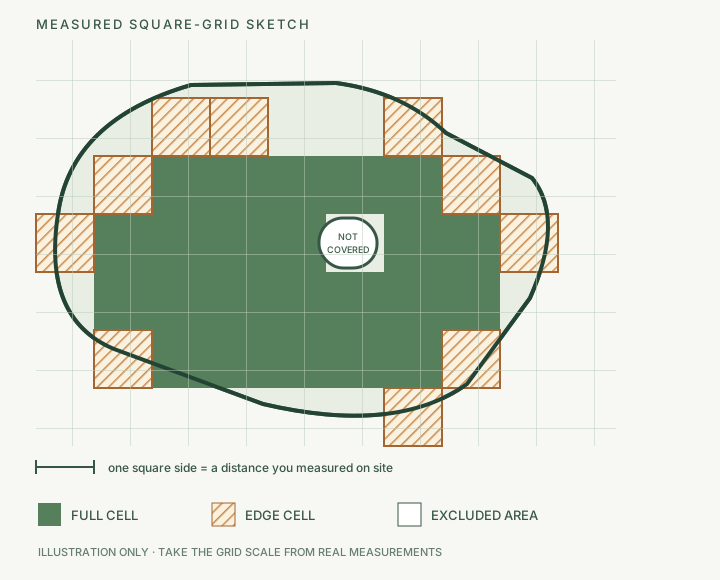
What the edge squares can change
Every edge cell is counted as half a square for the midpoint estimate above. Actual coverage may be less or more. This wider range keeps the sketch's uncertainty visible instead of hiding it in an extra-order percentage.
Area from — to — sq ft
New volume from — to — cu ft
Enter the printed bag volume to see the whole-bag range.
All boundary cells are between empty and full; this is a mathematical range, not a purchasing recommendation.
How to take the sketch outside
- Measure a few straight reference distances on site. Put them on graph paper at one stated scale; do not use a photo to set the scale.
- Trace the area where new mulch will go. Leave paths, planters, buildings and other unmulched islands out of the count.
- Count full squares and every square the boundary crosses. A smaller, accurately measured grid can reduce the effect of the boundary cells.
- Enter only the depth you intend to add. Read the bag volume from the exact product, if you need whole bags.
Estimated area = (full cells + 0.5 × boundary cells) × square side²
New volume = estimated area × added depth (in) ÷ 12
Whole bags = round up (new volume ÷ printed bag volume)
Boundary bag range = round up (low/high volume ÷ printed bag volume)
Checkable example, not a default: a measured 2 ft × 2 ft grid with 18 full and 8 boundary cells gives a midpoint area of 88 sq ft. At a user-chosen 2 in new layer, that is about 14.67 cu ft or 0.54 cu yd. If the chosen bag is labeled 2 cu ft, the midpoint takes 8 whole bags; the 12 to 17.33 cu ft boundary range spans 6 to 9 whole bags. Do not treat the example depth, grid size or package as a recommendation.
Source and limits
University of Georgia Extension describes transferring measured landscape areas to scale on graph paper. Kansas State University Agronomy explains the full-square plus half-of-partial-square arithmetic for tracing an irregular outline; that example is a leaf, so this tool applies the counting method to a measured bed sketch, not its plant context. Iowa State University Extension gives mulch volume as area × depth and explains cubic-yard and bag conversion.
The midpoint assumes every boundary cell is half covered; it is not a precision claim. If the sketch cannot be scaled from real measurements, the calculator cannot recover area from perimeter or an ordinary photograph. It does not choose safe depth, product, waste allowance, settlement factor or supplier quantity. A long bed that can be measured with equal-spaced width stations may be simpler in the curved-bed calculator; a true circular corner has a separate sector calculator.
Questions before you count
Can a perimeter measurement tell me how much mulch to order?
No. Different bed shapes can share a perimeter while enclosing different areas. Measure the bed, draw a sketch to scale, and count only the squares that will receive mulch.
Are boundary squares always half full?
No. Counting each boundary square as one half is a stated midpoint assumption, not a measurement. The calculator also shows the result if those squares contribute anywhere from zero to one full square each.
Can I use a photograph as the grid scale?
No. An ordinary or angled photograph does not provide a reliable ground scale. For an orthorectified overhead image or measured plan with a known length on the same plane, use the Mulch Photo Area Calculator. A traced image is still an estimate.