Top up mulch in pots, not the whole pot.
Measure the layer left in each group and enter the finished depth you want. The result counts only the gap to fill, then combines matching-container groups before rounding packages.
Measure each matching group
Use one row for pots with the same surface shape, size and layer left. A different depth or size gets its own group.
What the estimate counts
For each row, it finds the uncovered depth, multiplies by the opening area and container count, then adds the row volumes before package rounding.
- Added depth = max(your target − measured layer left, 0)
- Group volume = opening area × added depth × matching-container count
- Packages = round up(combined exact volume ÷ package volume)
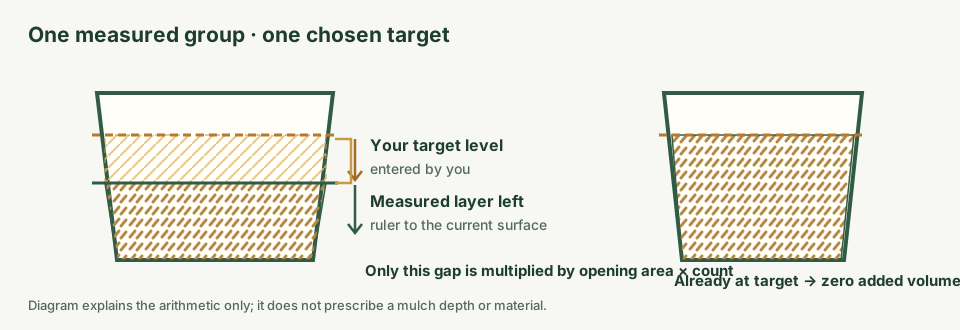
Worked example: six matching patio pots
The editable example uses six round openings 1.5 ft across, with 0.5 in measured and a user-entered 1 in target. The difference is 0.5 in. The combined opening area is about 10.60 ft², so the estimated added volume is about 0.442 ft³. With the example 2 ft³ package size, the combined estimate rounds to one whole bag. These inputs illustrate the arithmetic; they are not suggested container dimensions, mulch depth or product selection.
The calculator treats matching pots as one group, but retains a separate row result for each group. If a pot has more mulch left than the target you entered, that row contributes zero rather than a negative amount. Package rounding happens once after all rows are added.
Keep top-up volume separate from full container fill
This calculator estimates a surface layer from the opening dimensions and user-entered depth difference. It does not calculate potting mix inside the container. For a full planned fill, use the potting soil calculator. For existing mulch over garden beds, use the mulch refresh calculator. For a new landscape bed layer, return to the main mulch calculator.
For a round opening, area is π × (diameter ÷ 2)². A square opening uses side × side; a rectangle uses length × width. The estimate assumes those measured surface shapes represent the opening being covered; irregular or tapered surfaces may need to be split into measured groups. It does not account for stems, plant crowns, voids between coarse pieces, settling, waste, or supplier minimums.
The UF/IFAS container-production guidance describes measuring the container surface and applying area × mulch depth for quantity estimates. Its depth findings concern container-plant production; this calculator does not use them as homeowner advice or a default.
Container mulch top-up questions
How do I calculate mulch for a container top-up?
Measure the surface opening, enter the layer depth already left and your chosen finished depth, then enter how many matching containers share those measurements. The calculator multiplies opening area by the positive difference between target and existing depth, then sums the groups.
What if the existing mulch is already at or above my target?
That group adds zero volume. The calculator does not return a negative quantity or advise removing material; it only estimates additional volume from the depths you enter.
Does this calculate potting soil to fill a container?
No. This page estimates a surface mulch top-up only. Use the potting soil calculator for the container's planned fill volume.
Which measurements should I enter?
Measure the mulch surface opening for each group: diameter for a round opening, one side for a square, or length and width for a rectangle. Group only containers that share the same dimensions and measured depth; make another row when they differ.
Does the calculator recommend a mulch depth or material?
No. Enter a target depth and product yourself. The result is geometric volume only and does not determine a suitable depth, material, plant care practice or supplier specification.
How does it round the package count?
The calculator adds the unrounded volumes for all groups first, divides by the package volume you enter, then rounds the combined count up to a whole package. Use one product and package size per estimate.