Worked project example
Garden makeover shopping list: a measured worked example
A useful garden shopping list shows where every quantity came from. This example separates measured mulch, a separately measured edge, human-selected plants and unresolved quote items so none of them is guessed from an image.
Try the measured example in Planner Open the worked shopping list Calculate your own material order
Try a separate example copy. The Planner link loads only the two measured example areas and 10% example allowance. It does not change your regular saved project or import the sample quotes, edging or plants. Replace the dimensions with your own before ordering.
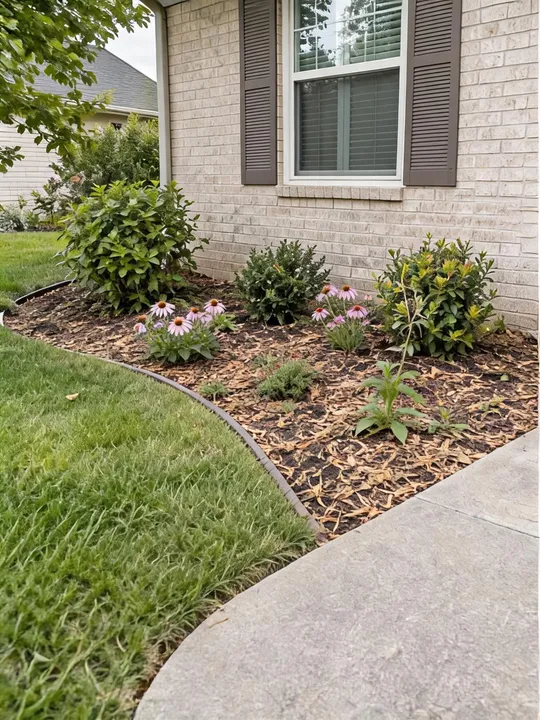
1. Confirm the visual direction
The brief records what should change and what must remain. In this example, the requested change is a mulch refresh with a tidier edge. The house wall, path, bed boundary, camera view and existing shrubs are marked to stay.
After reviewing the generated result, the selected image can be saved locally as a Concept Snapshot. The snapshot is a visual reference. It does not create plant names, quantities, spacing, measurements or an approved scope.
2. Measure the real areas
The homeowner measures two separate areas. Each area keeps its own shape and added depth; the calculator combines their volume only after the inputs are recorded.
| Measured area | Inputs | Exact volume |
|---|---|---|
| Front bed | 12 ft × 4 ft rectangle, 3 in added depth | 12.00 ft³ |
| Tree ring | 6 ft diameter circle, 2 in added depth | 4.71 ft³ |
| Combined | Two measured areas | 16.71 ft³ · 0.619 yd³ |
Calculation: the front bed is 12 × 4 × (3 ÷ 12) = 12 ft³. The tree ring is π × 3² × (2 ÷ 12) = 4.71 ft³. The calculator retains full precision before purchase rounding.
3. Convert volume into an order
With a user-selected 10% planning allowance, the combined volume becomes 18.38 ft³, or 0.681 yd³. The purchase options are:
- 2 ft³ bags: 18.38 ÷ 2 = 9.19, rounded up to 10 whole bags.
- Bulk: 0.681 yd³, rounded up to 1.0 yd³ when this example supplier sells in 0.5 yd³ increments.
The 10% allowance and 0.5 yd³ supplier increment are example inputs, not recommendations for every job. Enter the allowance and supplier rules that apply to your project.
4. Compare the quotes you actually received
| Purchase route | Example quote | Calculated total |
|---|---|---|
| 10 bags | 5 per bag + 10 delivery or pickup fee | 60 |
| 1.0 yd³ bulk | 42 per yd³ + 45 delivery | 87 |
In this demonstration, bags cost 27 less. The currency label is intentionally omitted because a currency selector does not convert prices. Use one currency and quotes for the same material. On another project, the bulk result can change when the quantity, minimum order or delivery fee changes.
5. Build the project shopping list
The visual concept and the measured order now sit beside human choices. A practical list for this example could contain:
Measured order
Dark brown wood mulch: 10 × 2 ft³ bags, or 1.0 yd³ bulk. Choose one route after confirming the product and quote.
User-entered items
Steel edging: 28 ft from a site measurement. Low shrubs: six, selected only after a local climate and mature-size check.
Still unresolved
Tax, disposal, soil preparation, plant varieties, utility checks and labor remain blank until someone confirms them.
Nothing in this list is inferred from the concept image. The mulch comes from geometry; the edging length is a separate site measurement; the shrubs are a human selection.
COPYABLE WORKED LIST
Choose the rows you want to copy
Example values only. Verify every row for your site and supplier.
| Copy | Item | Location | Quantity | Source | Status |
|---|---|---|---|---|---|
| Dark brown wood mulch | Front bed + tree ring | 10 × 2 ft³ bags or 1.0 yd³ bulk | Measured volume + user-entered 10% allowance | Choose one route after confirming product and quote | |
| Steel edging | Front bed | 28 ft | Separate site measurement | Confirm product, joints and waste | |
| Low shrubs | Front bed | 6 plants | Human selection placeholder | Verify climate, light, soil, mature size and local restrictions | |
| Delivery or pickup | Whole order | Not confirmed | Supplier quote | Record the route, fee and date | |
| Preparation, disposal and labor | Whole project | Not confirmed | Site check or contractor quote | Leave unresolved until confirmed |
Copying rows does not save the list. The example link opens a separate local worksheet; the regular Planner link opens your existing project, if any.
6. Freeze the version that is ready to use
In the project planner, the selected concept can be attached to the related areas. Customer and crew visibility start off. When the build list, measurements and order reference are ready, approval freezes that exact selection revision. Changing the concept, related areas or audience settings starts a new revision while the prior approval remains in the record.
Price comparisons stay in the cost worksheet. Add only the supplier, order and project details you have confirmed to the planner record.
The customer summary, crew worksheet and completion record serve different purposes. A concept image appears only in the output explicitly selected for it.
Use the same workflow on your project
- Upload one garden photo, confirm what changes and what stays, then review one concept.
- Measure every bed and enter the added material depth.
- Add local material, delivery and labor rates.
- Build and approve the project record with the selected concept as an optional reference.
Garden material list questions
Can the AI concept calculate mulch or soil quantities?
No. Quantities come from dimensions and depths you enter. The concept is a visual direction only.
Can I use the generated plants as a shopping list?
No. An image model can invent species, scale and spacing. Select plants only after checking climate, light, soil, mature size, availability and local restrictions.
Why keep each bed as a separate area?
Different beds can have different shapes, depths, materials or completion states. Separate records make the combined order traceable and let the planner map a concept to the correct areas.
Is bagged or bulk mulch always cheaper?
No. Compare the whole-bag quantity with the supplier's rounded bulk order, then include the relevant delivery or pickup fee in the same currency.