Mulch calculator Measured bed outline
Use the corners you measured
Mulch Calculator by Boundary Coordinates
Enter each measured corner in order around the bed. The calculator closes the outline, calculates its flat polygon area, and applies the added depth and bag volume you enter.
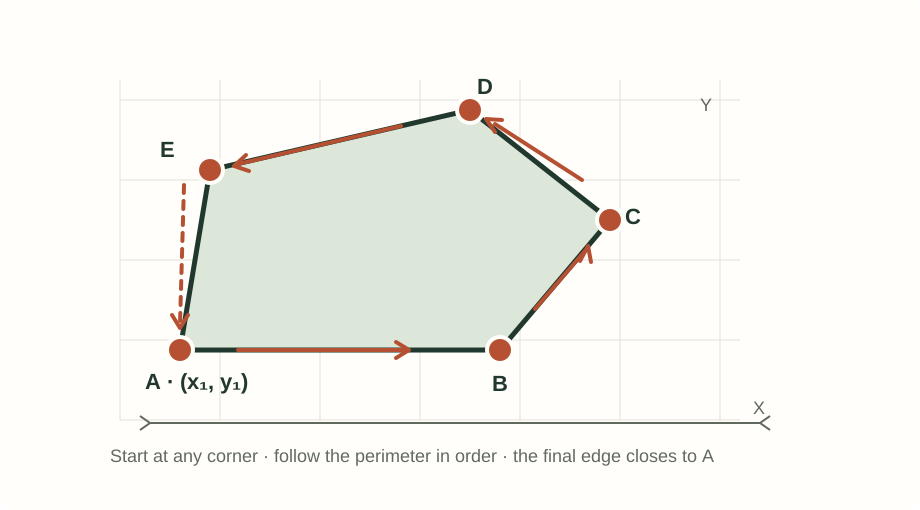
How the point-area estimate works
For a flat, simple outline, the tool applies the shoelace area formula to the ordered corner coordinates. Clockwise and counterclockwise point order produce the same area. If a measured edge curves, the result is the straight-sided polygon made by your points; add points where the boundary changes instead of treating those segments as exact arcs.
Imperial volume = area (sq ft) × added depth (in) ÷ 12
Metric volume = area (sq m) × added depth (cm) ÷ 100
Whole bags = volume ÷ the entered bag label, rounded up
Iowa State University Extension calculates mulch volume from measured area and depth, then converts that volume to bags or cubic yards. This worksheet first calculates area from the points you provide. Unit conversions follow NIST's published measurement tables. The formula is not a land survey, curved-boundary model, or accuracy guarantee.
Only use a flat coordinate sketch with the same length unit on both axes. These are not latitude/longitude values. The calculator checks for crossed or touching outlines and asks you to reorder the points; it does not repair a sketch automatically.
Sources: Wolfram MathWorld's polygon-area formula; Iowa State University Extension's mulch quantity method; NIST Handbook 44 (2026), Appendix C measurement conversions.
Choose the measurement method that matches your notes
- Scaled photo or measured plan: calibrate a reference length and trace the boundary yourself.
- One curved strip with equal stations: enter a baseline and perpendicular widths.
- Branches or gaps: estimate covered cells on a scaled measurement grid.
- Known net area and unmulched pieces: subtract obstacles from measured bed groups.
Boundary coordinate questions
How should I enter the boundary points?
Enter every corner once in clockwise or counterclockwise order. Use the same flat x/y grid and length unit for all values; the final point is connected back to the first.
Can this calculator measure the bed from a photo?
No. The calculation uses only the ordered points you enter. A photo has no reliable scale unless you measure it separately; use the site's photo worksheet for a manually calibrated image.
Does the area follow a curved garden edge exactly?
The result is the area of the straight-edged polygon connecting your points. Add points where a curved boundary changes; the tool does not turn those straight segments into exact curves or a survey.
Does the calculator choose my depth or add extra bags?
No. Enter the added depth you plan and the volume printed on the bag. The calculator chooses neither value and includes no hidden waste or order allowance.
Continue the material plan
Use the mulch project planner to record zones, supplier details, and a separate ordering cushion. This coordinate worksheet reports only area and volume derived from the points and depth you enter.