ChatGPT garden design prompt
Start with one bed. Say what should change and what must stay; keep real measurements separate from the visual idea.
Copy a first draft
Copies text only. Paste it into your own ChatGPT account; attach a photo separately if you choose. This page does not connect to ChatGPT.
Read the starting prompt
Help plan a visual refresh of the garden bed in the photo I attach separately.
First ask which single area I want to change, what must stay, and which site conditions I have actually observed.
Keep the existing house, paths, bed boundary, mature plants and viewpoint when those are present. Describe one concept; do not treat that keep list as a guarantee.
Separate ideas from facts. Use only dimensions I provide from real measurements. Do not estimate lengths, depth, area, bag counts, plant quantities or costs from the photo.
List missing facts before a materials or planting recommendation. Leave unverified plant suitability and local prices unresolved.
Customize the garden briefCorrect an existing conceptCheck the mulch example
The prompt is model-neutral. For ChatGPT, OpenAI's current guide names ChatGPT Images 2.5 and lets you edit an uploaded photo by selecting an area or describing the change directly. Selection marks can be imprecise, and edits may cross the marked area. For a garden revision, ask for one change, name what must stay, then review the full result against the original. Use it to explore a look; measure the bed before calculating materials.
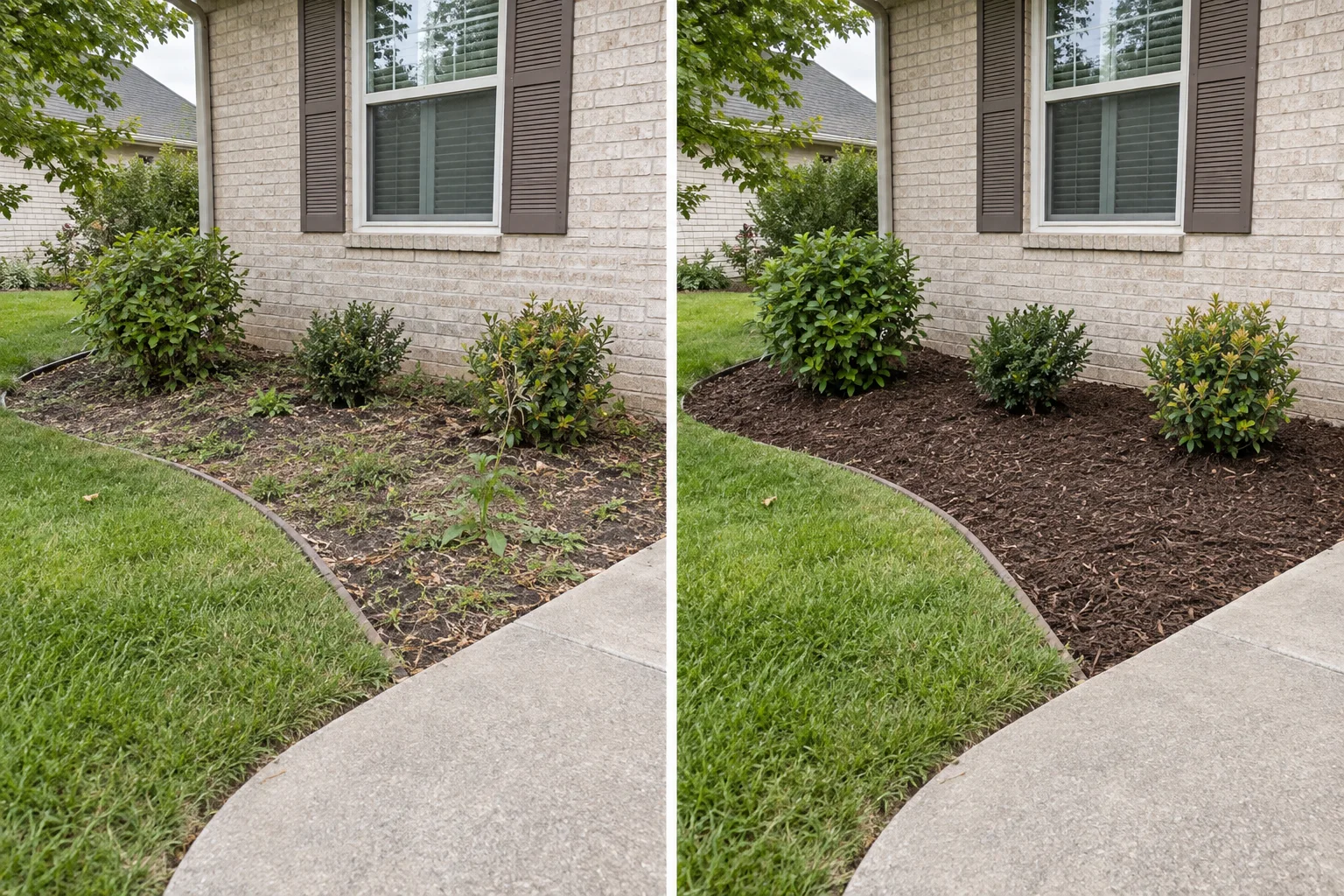
What an AI garden design brief should contain
The change
Name one clear task: refresh the mulch and edge, rethink the planting bed, or explore a different garden style.
What must stay
List the house, path, mature tree, bed boundary, camera view and any other element the concept should retain.
Observed conditions
Record only what you know: sun or shade, drainage behavior, maintenance preference and budget direction.
Add a short instruction for the desired look. Avoid contact details, guessed measurements and unverified claims about plant suitability.
A brief you can adapt
CoverCalc Pro builds this summary from your form and asks you to confirm it before generation. Reviewing or copying the brief uses no image credit. The copied text is model-neutral, so you can attach your photo separately in another image model if you prefer.
Model-neutral correction
Build an AI garden revision prompt
Describe the problem, ask for one focused change and identify the parts of the original photo that must remain. This prepares text for your next attempt; it cannot lock pixels or guarantee that an image model will preserve every element.
Revision prompt preview
Review problems and choose the next action
| What you see | Check first | Focused revision | Human check |
|---|---|---|---|
| The path, house or tree changed | Compare every protected element with the original photo | Restore those elements and change only the requested garden area | Compare the next result again; a prompt cannot guarantee a locked region |
| The makeover became a construction project | Look for new paving, structures or an enlarged bed | Limit the concept to the existing bed and its current outline | Confirm the actual work scope separately |
| The direction works but one detail does not | Name the single detail that needs changing | Keep the current direction and revise only that detail | Record the selected version before trying again |
| The result looks good but the plants or scale seem uncertain | Separate visual ideas from product and measurement facts | Do not regenerate just to invent missing facts | Verify species, mature size, spacing, climate and dimensions independently |
The seven-step garden workflow
- Photograph one clear area. Avoid faces, house numbers and vehicle plates.
- Define the change and the constraints. Say what to edit and what must remain.
- Review the written brief. Correct it before sending the image.
- Generate one concept. Compare it with the original and check whether important structures moved or disappeared.
- Make an explicit decision. Keep the direction or record the exact change to try next. Save the selected concept locally only when you want it in the project.
- Measure the real areas. Enter each bed's shape, dimensions and added depth in the material calculator.
- Price and approve the work. Add local quotes, build the item list, map the concept to the relevant areas and freeze the chosen revision in the project planner.
What comes from the photo, and what does not
| Project information | Source |
|---|---|
| Visual direction, color and general style | The selected concept, after human review |
| Bed area, depth, cubic volume and bag count | Your measurements and calculator inputs |
| Material, plants, edging and quantities | Your confirmed selections and local suitability checks |
| Material, delivery and labor cost | Your supplier and crew rates |
| Customer or crew visibility | Your explicit project setting; both start off |
Review the concept before using another credit
- Did the house, path, tree and bed boundary stay in place?
- Does the result show the requested change rather than a different yard?
- Which part of the direction is worth keeping?
- What single correction would make the next concept more useful?
- Are any plants, proportions or structures visually plausible but still unverified?
Switching between concepts already generated in the tab uses no credit. A new generation does. Download a result or choose Use this concept in project before leaving if you want to keep it.
From concept to garden shopping list
The next useful page is not another gallery. It is a traceable project record. Our worked garden makeover example shows a front bed and tree ring moving through exact volume, a 10% user-selected allowance, whole bags, a supplier's bulk increment, local quotes and human-selected build items.
The example also shows what remains unresolved. An AI image does not verify climate, species, spacing, utilities, drainage design, taxes, disposal or labor.
A concept cannot order the mulch. Measurements can.
Arithmetic demonstration, not a customer project: suppose a rectangular bed is measured at 10 ft by 6 ft, and the user chooses to add 3 inches of mulch. No allowance is included; 3 inches is an example input, not a recommendation for every bed.
- Measured area
- 10 × 6 = 60 ft²
- Entered added depth
- 3 ÷ 12 = 0.25 ft
- Calculated volume
- 60 × 0.25 = 15 ft³
- Bulk equivalent
- 15 ÷ 27 ≈ 0.556 yd³
- Entered 2-ft³ bags
- 15 ÷ 2 = 7.5, so buy 8 whole bags
Eight entered 2-ft³ bags contain 16 ft³, leaving 1 ft³ beyond the demonstration's calculated volume. That is package rounding, not an added project allowance. A supplier's bulk minimum, delivery charge and local price are still unknown.
Use Rectangle, Imperial, length 10, width 6, depth 3 and a 0% allowance to reproduce the volume; choose a 2-ft³ bag. Enter your own measured values for your actual project.
Need more than one bed or a saved work plan? The existing two-area worked example continues to its separate example worksheet. The project planner records your confirmed areas and supplier decisions.
Why a garden photo is not a quantity survey
Did the path move, or did the image invent more land? Reject that result for planning the unchanged yard, or use the revision builder to request one correction and compare again. Keep a concept only when its requested visual direction and protected elements pass your review; it still supplies no purchase quantities.
OpenAI's vision limitations include imprecise spatial localization, approximate object counts and possible incorrect descriptions. The practical boundary here is stricter: only your measured inputs supply area and material volume. This is a workflow choice, not a claim that a prompt makes image measurements reliable.
What facts are still missing? Confirm the actual material, added depth, plant suitability and local quote before turning a visual suggestion into a shopping list. For a measured mulch-only task, use the ChatGPT mulch planning prompt rather than starting another garden image.
Product ideas borrowed from practical AI workflows
We studied public projects by Japanese farmer Hiroki Tomiyasu for their process, not as a claim that his whole farm system is available here. Three ideas directly shaped this garden workflow:
- blog_nanobanana: turn source material into structured image prompts and a shared style guide, then accept specific revision instructions instead of restarting from an open-ended prompt.
- agri-ai-agent: connect information to tasks and completion records instead of leaving the result as a standalone answer.
- Project Nae: preserve an observation, human confirmation and action record.
CoverCalc Pro applies those ideas as brief → concept → decision → measurements → build list → approval → completion. It does not reproduce farm-control hardware, sensor automation or satellite monitoring.
AI garden design brief questions
How do I revise an AI garden design without changing everything?
Compare the result with the original photo, name the incorrect change, request one focused correction and list the elements that must stay. Use the original photo as the source of truth and review the next result again.
Can a revision prompt lock part of the original photo?
No. A clear keep list can guide the model, but it does not create a guaranteed mask or pixel lock. Check the house, paths, boundaries, mature plants and viewpoint after every new result.
Should I include dimensions in the image prompt?
Include only dimensions you actually measured, and keep them as separate facts. Do not expect the image to preserve scale or calculate area.
Can the AI keep my house, path or tree unchanged?
List each protected element in the brief. The instruction improves clarity, but the model can still alter structures or proportions. Compare the result with the original.
Can the concept choose plants for my climate?
No. It can show a visual planting direction. Confirm species, mature size, sunlight, soil, drainage, climate, availability and local restrictions independently.
Can I prepare a customer or crew document?
Yes. Save a selected concept locally, attach it to the planner and explicitly choose whether it may appear in the customer summary or crew worksheet. Measurements and the approved build list remain the source for quantities.