Mulch calculator / Measure by steps
Mulch Calculator by Steps
Count the footfalls along each bed side, calibrate your own step length on a path you know, and get an area and mulch estimate. No average stride is assumed.
Your estimate
Mulch to add
Enter a reference distance, the footfalls counted along it, each bed's side counts, and the depth you plan to add.
—sq ft estimated area
—cu ft to add
—cu yd to add
—whole bags · enter label volume
Calibrated length per footfall: —
Check the inputs
Bed-by-bed area
Each row uses the same calibrated footfall length.
| Bed | Length | Width | Estimated area |
|---|---|---|---|
| Enter footfalls for a bed to see its area. | |||
Field method
Turn a walk into a quantity
Calibrate once. Apply the same measured pace to each bed.
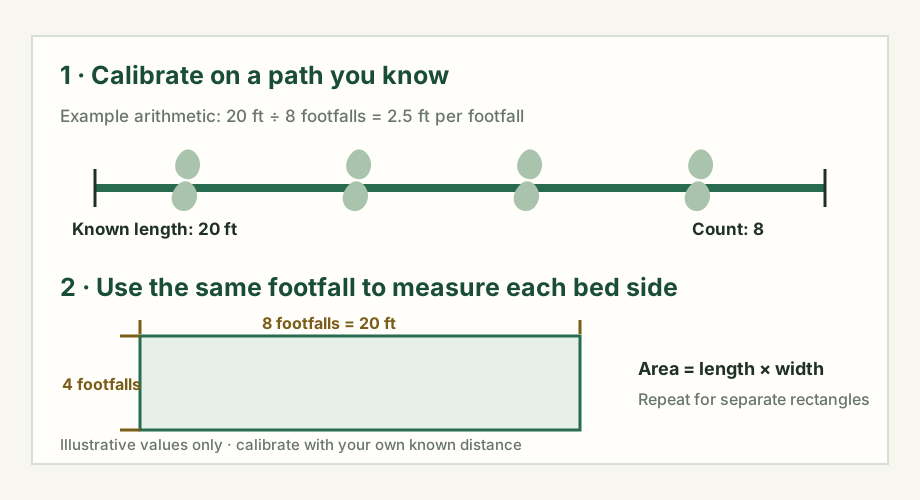
- Choose a known straight distance. Enter its length in feet, then walk it and count each footfall. Use the same definition of a footfall for the path and for the bed.
- Walk the bed sides. Enter the length and width counts for one rectangle. Add another row for a separate rectangle; do not overlap zones or include paths.
- Choose the new layer depth. Enter only the depth you intend to add. If you are buying bags, read the volume from that product's label.
- Check the order units. The result shows estimated square feet, cubic feet, cubic yards and—when a bag volume is entered—whole bags rounded up.
How the estimate is calculated
Footfall length = known path length ÷ footfalls on path
Side length = side footfalls × footfall length
Area = sum of (length × width)
Volume (cu ft) = area (sq ft) × depth (in) ÷ 12
Cubic yards = cubic feet ÷ 27 · Whole bags = round up (cubic feet ÷ labeled bag volume)
Worked example
A 20 ft reference path takes 8 footfalls, so the calibrated average is 2.5 ft per footfall. Two rectangular beds measure 8 × 4 and 5 × 3 footfalls. Their estimated areas are 200 sq ft and 93.75 sq ft, or 293.75 sq ft combined. At an entered 2 in layer, that is 48.96 cu ft (1.81 cu yd). If the chosen bag label says 2 cu ft, the estimate rounds up to 25 whole bags.
These are example inputs, not a default stride, recommended depth, or product size.
What the step estimate cannot know
The result depends on the reference distance, how you count footfalls, and how straight the bed sides are. It does not measure a bed or account for turns, slopes, uneven paces, curved edges, settling, waste, delivery minimums or supplier rounding. A photo without a known scale cannot supply those dimensions.
For a curve, branch or island, use the curved-bed width worksheet or measured grid-sketch calculator. The multiple-bed guide explains how to keep depths and product orders separate. Iowa State University Extension shows the area × depth method and how to convert cubic feet into bags or cubic yards in its garden-bed mulch guide.
For mulch, Volume = Area × Depth. This page converts your footfalls to feet first; the layer depth you enter remains your decision.
Questions about measuring by steps
Can I use a step count if I do not know my step length?
A step count alone does not establish a ground distance. Measure a reference path, count the footfalls along it, and use the same counting method when you measure each bed side.
How does the step calculator estimate bed area?
It divides your reference-path length by your footfall count to calculate an average length per footfall. It multiplies each bed-side count by that value, calculates each rectangular area, and adds the areas.
Can I use this for a curved or irregular bed?
This calculator treats each zone as a rectangle. Split a bed into separate rectangles only when those measured pieces cover the area without overlap; use a curved-bed or grid method for a shape that is not well represented by rectangles.
Does the result include extra mulch or a recommended depth?
No. Enter the depth you plan to add and the volume printed on your bag if you want a bag count. The calculator adds no waste, settlement, supplier minimum, or extra-order allowance.