Planning guide
How to Calculate Mulch for Multiple Beds
For each bed: net area (sq ft) × added depth (in) ÷ 12 = cubic feet. Add the volumes only for beds receiving the same product.
Divide the group's total by 27 for cubic yards, or by the actual bag volume and round up once for bags. Different products or separately allocated deliveries need separate counts.
Already mulched? Use the multi-bed refresh calculator to enter each bed’s measured existing depth and selected target depth, then calculate the combined top-up.
Calculate multiple beds nowSubtract paths and pads
In the main calculator, choose Add another area for every bed and enter its own shape, measurements and added depth. For a bed with uncovered paths or pads, find its net area in the single-bed subtraction worksheet, then enter that footprint as a Known area.
Leave paths out before combining your beds
For one rectangular bed with uncovered paths or pads, use the single-bed net-area worksheet in How Much Mulch Do I Need?. It subtracts the non-overlapping pieces you measure; it cannot detect overlap from their dimensions.
Copy that bed's net square-foot area into a separate Known area row in the main mulch calculator. Repeat for the other beds and enter each bed's own added depth. Combine unrounded volumes only within the same product order.
For several beds, copy each net area into a separate Known area in the main calculator and keep its added depth separate. Combine unrounded volumes before rounding one shared product order to bags. If the beds use different product labels or bag sizes, the Mulch Order by Zone worksheet keeps each product order separate.
Why separate beds matter
Multiplying one total area by one depth is only safe when every section has the same depth. Keeping beds separate lets you use a rectangle for a border, a circle for a tree ring, and a different depth wherever the project requires it.
The mulch calculator adds those areas together for a volume estimate. The project planner carries the same areas into an order record, supplier notes, an order-by date, and an installation checklist.
What to enter for each bed
- Name the bed so the result can be checked on site.
- Choose Rectangle, Circle, Triangle or Known area and use the units you measured.
- Enter the additional depth for that bed; when a usable layer remains, calculate it with the existing-versus-target depth tool instead of reusing a full-depth default. For several beds sharing one product, the multi-bed refresh calculator combines their measured top-ups into one order.
- Choose the bag size printed on the product label when you are buying bags.
- For bulk delivery, confirm the supplier's minimum order, delivery access, and available quantity.
Order different products without mixing the counts
The main calculator uses one bag volume for all areas in a run. A material category such as Mulch is not a product name. Keep separate records when beds need different products or package volumes.
- Group the beds by product. In the main calculator, include only the beds receiving that product. Name each area and enter its measured footprint and added depth. Use Add another area for the other beds in this group.
- Match this product's settings. Select the bag volume on its label and review the planning allowance, supplier minimum, order increment, density and any prices or fees. Do not reuse another product's quote. If the bag volume is not listed, do not substitute a nearby size: divide the group's exact volume by the actual package volume in matching units, then round up, adding any separately chosen allowance first.
- Save this order before changing inputs. Use Copy estimate, then label the copied text with the specific product name in your own notes. Keep the bed names, bag volume and whole-bag count together; the copy button does not save a product list inside the calculator.
- Start the next product's group. Keep one area row, replace its name, shape, units, measurements and added depth, and remove the other previous rows. Add the next group's beds and recheck every product and supplier setting before copying its separate estimate.
For example, two beds of 12 sq ft each at an entered 1-inch added depth need 2 cu ft together: one bag if both use the same 2-cu-ft product. A different product for a 12-sq-ft bed at an entered 2-inch depth also needs 2 cu ft: one 3-cu-ft bag if that is its label volume. Save these as two orders, not one mixed bag count. These depths illustrate arithmetic, not product recommendations.
Do not deduct one product's leftover volume from another product's order. Separately allocated deliveries may also need separate counts even when the product matches.
Measure irregular beds without guessing from a photo
Divide a curved or irregular bed into smaller rectangles, circles, and triangles. Measure each section on site, add the section areas, and enter the total as a Known area. Keep sections separate when their added depths differ. If repeated perpendicular width readings are easier than breaking the footprint into shapes, use the curved-bed width-station worksheet; it approximates area from your measurements rather than providing a site survey.
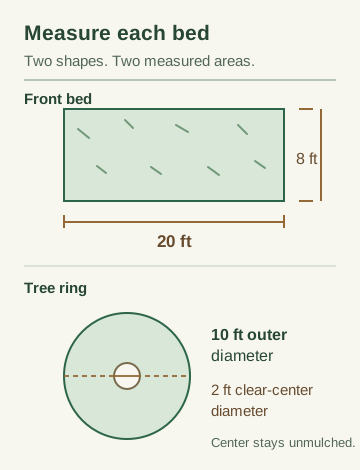
For a tree ring, subtract the clear center from the outer circle: ring area = π × (outer radius² − clear-center radius²). This keeps the unmulched space around the trunk out of the material estimate. An AI garden image can suggest a visual direction, but it cannot supply these measurements.
For several rings that already have mulch, the tree mulch ring calculator keeps trunk diameter, bark clearance and current depth separate for each tree before combining the new material order.
Worked example
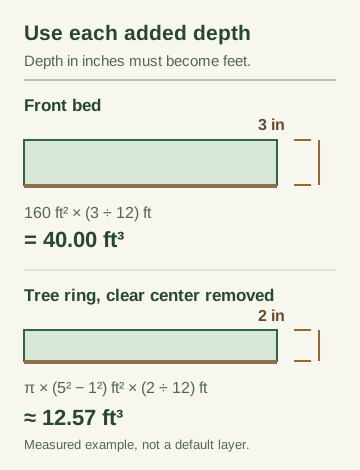
Suppose a project has a 20 × 8 ft front bed needing a 3-inch added layer and a tree ring with a 10 ft outer diameter, a 2 ft clear-center diameter, and a 2-inch added depth:
- Front bed: 40.00 cubic feet, about 1.481 cubic yards, or 20 two-cubic-foot bags.
- Tree ring: about 12.57 cubic feet, about 0.465 cubic yards, or 7 two-cubic-foot bags.
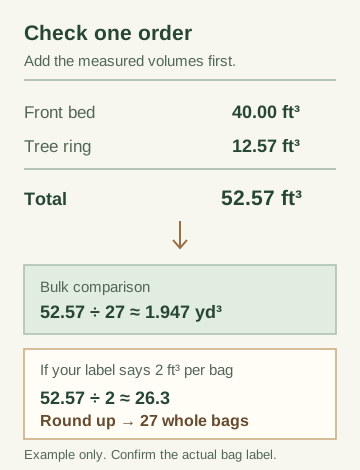
- Bulk volume: about 52.57 cubic feet, or 1.947 cubic yards.
- Bag purchase: 27 whole bags when each bed is rounded up separately.
The combined volume is about 26.28 theoretical bag-equivalents. Rounding each delivery section separately gives 27 bags; combining one product order and rounding once also gives 27 in this example. Product labels, settling, and supplier minimums can still change the final order.
For a smaller two-area example that starts with an AI garden concept and continues through local prices and a confirmed build list, see the garden makeover shopping list workflow.
Questions for a multiple-bed order
How do I leave paths out of a multiple-bed mulch order?
Check each bed separately. Subtract only the non-overlapping uncovered pieces inside that bed, then enter its net square-foot footprint as a Known area in the main calculator. Give every bed its own added depth.
Should I round bags for each bed or for the whole project?
For one shared product order, add the unrounded bed volumes and divide by that product's bag volume, then round up once. Separate products or separately allocated deliveries need separate counts. In the main calculator, include only one product's beds and match its bag volume. Use Copy estimate and label the saved text with that product's name before replacing the areas and settings for the next product. Do not add rounded worksheet bag counts and call that the minimum shared order, or deduct one product's surplus from another product's order.
Calculator or project planner?
If the material is pine straw, use the dedicated pine straw calculator for bale coverage, fresh versus refresh planning, tree rings and an optional order allowance.
Use the calculator when you need a fast quantity check. Use the planner when the result must become a work order with a date, supplier, delivery details, crew notes, and a printed checklist.
Open the calculator Open the project planner
Check the estimate before ordering
Mulch depth and bag volume are calculation inputs, not a product guarantee. Confirm the coverage printed on the bag, the supplier's bulk measurement, delivery conditions, and the amount of extra material that makes sense for your site. Iowa State University Extension describes the same area × depth approach in its garden-bed mulch guide.