Mulch calculator Pickup capacity
Mulch Pickup Bag Capacity Calculator
How many bags fit in one trip? The limit is the lower of your remaining payload and the measured bed grid.
Per-trip arithmetic limit
—bags
The lower of the weight count and bed-space count sets this number. Enter both sets of measurements below.
Add an order count to calculate the arithmetic trip count.
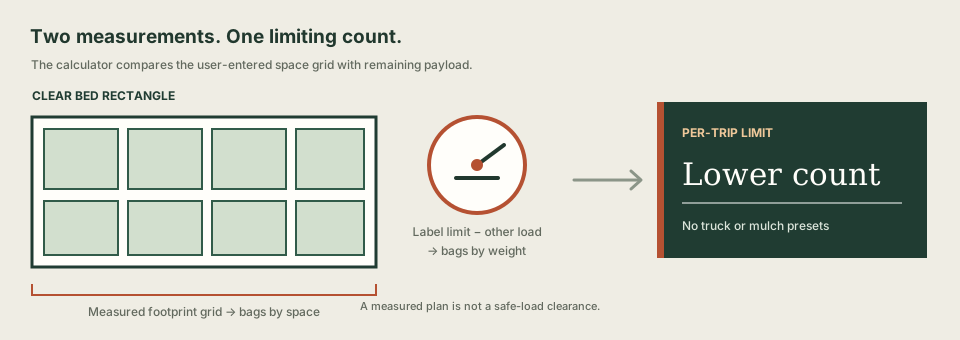
Why use both measurements?
A bag count based only on weight can exceed the clear bed grid. A count based only on footprint can exceed the payload left after people and equipment are aboard. This page reports both limits separately and uses the lower one for its per-trip arithmetic.
Remaining label amount = combined occupants-and-cargo limit − occupants and other cargo aboard
Bags by weight = floor(remaining label amount ÷ measured full-bag weight)
Bags by space = the larger capacity from two uniform footprint orientations
Bags per trip = min(bags by weight, bags by space)
Trips for an entered order = ceiling(order bags ÷ bags per trip)
The label field follows the combined occupants-and-cargo wording described by NHTSA's vehicle-label interpretation, checked October 7, 2026. This tool only performs arithmetic on values you enter; it does not verify the label, weigh people or cargo, or assess whether a load is safe.
What this pickup estimate leaves out
- It uses one clear rectangle and two uniform bag orientations. Irregular bed openings and mixed arrangements are not modeled.
- Bags at each footprint is your input. The result does not recommend a stack height or assess stability.
- It does not assess axle, tire, suspension, trailer, tongue-weight, visibility, load distribution, weather, road conditions or cargo securement.
- It does not guess vehicle payload or mulch weight. If a number is unknown, check the exact vehicle instructions and the supplier or product information before relying on it.
For the separate detail view, use the mulch bag weight calculator or mulch bag storage-space calculator. To work backward from bag count to covered area, open the bags-to-area calculator.
Mulch pickup questions
How many bags of mulch fit in one pickup trip?
Enter the combined occupants-and-cargo limit from your vehicle label, the weight of occupants and other cargo already aboard, a scale reading for one complete matching bag, and the clear bed and filled-bag dimensions. The calculator counts bags by payload and by two measured grid orientations; the lower count is the arithmetic limit per trip. It does not determine a safe load.
Should I use the bag label weight or weigh a full bag?
Use a scale reading for one complete matching bag as carried. The load calculation needs the mass that will be in the vehicle, including the package. This calculator does not infer bag weight from the cubic-foot label or a mulch average.
What does the vehicle label limit mean?
Enter the combined occupants-and-cargo amount shown on the vehicle's Tire and Loading Information label. Then enter the weight of the occupants and non-mulch load already aboard in the same unit. The difference is only a planning amount; confirm your own vehicle's instructions and ratings.
Does a fit result mean the load is safe?
No. This is arithmetic from your entries, not a safe-load clearance. It does not check axle, tire, suspension, trailer, weight distribution, visibility, stacking, cargo securement, road conditions or vehicle modifications. Follow the instructions and ratings for your exact vehicle and product.
What if the pickup bed has wheel wells or an irregular shape?
Measure one clear rectangle that is no larger than the usable bed area, including the narrowest section around obstructions. The calculation compares only two uniform bag orientations in that rectangle; it does not model irregular openings or mixed packing.
Before you buy or load
Use the mulch bag coverage calculator to estimate a product count for your measured bed. Use this pickup page only with the exact vehicle label amount, a full matching bag's scale reading and your own clear bed measurements.