Mulch calculator / Circular borders
Circular Mulch Border Calculator
Measure the outside circle and the open center. This calculator counts only the mulch ring between them, plus the edge length on each side.
Measure the ring
Enter two diameters, or one diameter and the width between the circles. Measurements must share a center.
Added mulch volume
—
— —
- Mulched ring area
- —
- Whole bags
- —
- Package surplus
- —
- Inner edge
- —
- Outer edge
- —
- Combined edge length
- —
- Estimated bag cost
- —
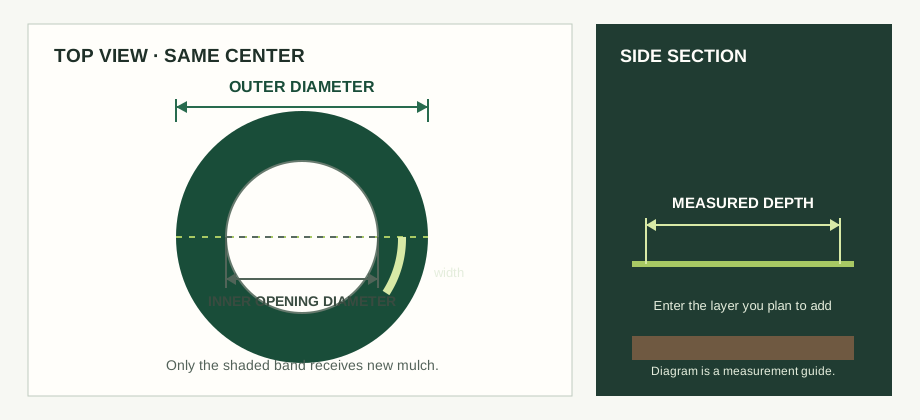
How the circular border is calculated
The opening is removed from the outside circle before depth is applied. This shape is also called an annulus. The width options derive the missing diameter from the width you enter.
Ring area = π ÷ 4 × (outer diameter² − inner diameter²)
Volume in cubic feet = ring area in square feet × added depth in feet
Whole packages = volume ÷ printed package volume, rounded up
For example, a 12 ft outside diameter and 8 ft inside diameter make a 62.83 ft² ring. At a measured 3 in added layer, that is 15.71 ft³ or 0.58 yd³. With a 2 ft³ package label, the estimate rounds up to 8 bags. The example is arithmetic only; it does not prescribe a mulch depth or bag size.
Inner and outer edging lengths use circumference = π × diameter. Combined edge length is their sum. It is a linear measurement, not a roll-cut plan; joins, overlaps and actual product instructions remain separate.
The calculator assumes the inner and outer circles have the same center and the added depth is uniform. It does not infer dimensions from an image, estimate an offset ring or calculate an existing-layer top-up. For tree trunk clearance, current mulch depth or several trees, use the tree ring calculator. For compatible edging segments, use the mulch edging roll-cut calculator.
Length conversion uses the international foot definition: 1 ft = 0.3048 m exactly. See NIST Handbook 44, Appendix C. Volume conversions follow by cubing the length conversion.
Circular mulch border questions
How do I measure a circular mulch border?
Measure the outer and inner diameters across the same center, then enter the depth you plan to add. You can also enter one diameter and the ring width.
Does the calculator assume the inner and outer circles share a center?
Yes. It treats the ring as two circles with the same center. Offset or irregular borders need to be split into measured shapes.
Can this replace the tree ring calculator?
No. Use the tree ring calculator for trunk size, bark clearance, existing mulch depth or several trees. This page only calculates a new layer between two measured circles.
Does it calculate edging rolls?
It reports inner and outer edge lengths and their combined length. A roll plan also depends on run segments, joins, overlap and product instructions; use the edging roll-cut calculator to plan cuts.
Plan the next material step
Use the main mulch calculator for rectangles, circles without an opening, triangles and measured areas. To compare store bags with a bulk quote, continue to the mulch quote check.