Check the measured bed
For 100 sq ft at a chosen 2 inches, the arithmetic gives 16.67 cu ft, or about 0.62 yd³. A written 0.75-yd³ quote states 20.25 cu ft, about 3.58 cu ft above that theoretical requirement.
Mulch calculator Check one written quote
Put one quote beside your own measurements. Check whether its stated quantity covers the bed, then check whether quantity × rate matches the printed material line.
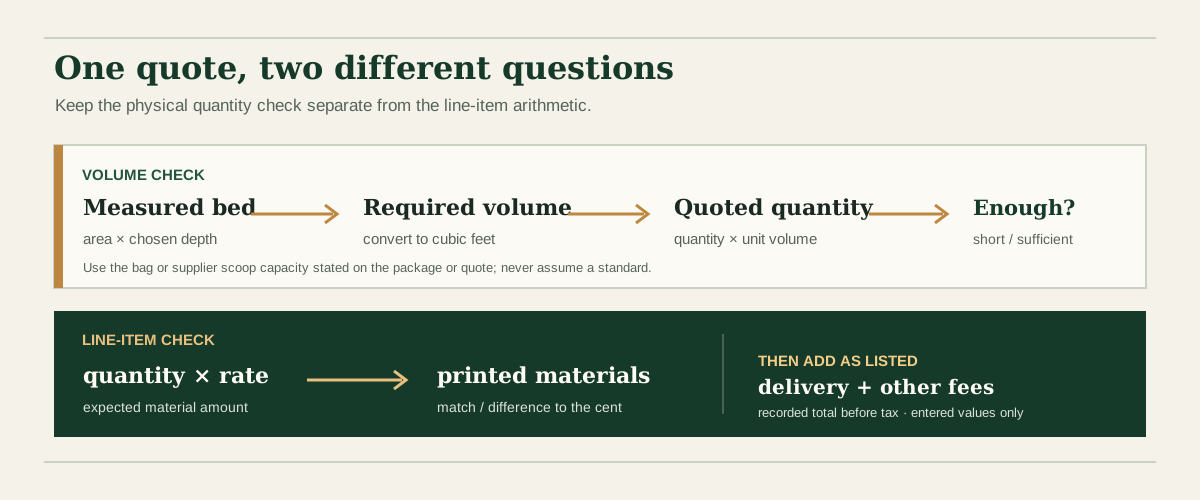
A written quote can look plausible and still leave two different questions unanswered. First, does its stated amount translate to enough volume for the bed you measured at the depth you chose? Second, does the stated quantity multiplied by the unit rate equal the material subtotal printed on the quote? This tool reports those checks separately so an extra fee or an unexplained arithmetic difference does not get mixed into the volume calculation.
The area-and-depth relationship follows the standard volume calculation used by Iowa State University Extension’s mulch quantity guide: multiply bed area by depth after expressing depth in feet. This page converts inches to feet by dividing by 12; cubic yards are converted using 27 cubic feet per cubic yard. Formula checked October 7, 2026.
The comparison is theoretical. It does not add an overage for waste, gaps, uneven ground, settling, delivery conditions or a supplier’s minimum load.
For 100 sq ft at a chosen 2 inches, the arithmetic gives 16.67 cu ft, or about 0.62 yd³. A written 0.75-yd³ quote states 20.25 cu ft, about 3.58 cu ft above that theoretical requirement.
At an entered rate of $42.00 per yd³, 0.75 yd³ multiplies to $31.50. The example’s printed materials line is also $31.50, so those entries match to the cent.
Add the entered $25 delivery fee to the printed materials line for a recorded $56.50 before tax. The fee does not change how much mulch the quantity represents.
All figures above are editable arithmetic examples, not a current store price or a recommendation about how deep to mulch.
The calculator uses the area, depth, quoted unit, unit capacity, rate, subtotal and fees that you enter. It does not inspect a supplier’s document, verify stock, estimate a fair local price, identify discounts, tax or delivery rules, or explain why two written figures differ. A subtotal difference may come from a coupon, tier price, discount or another term that is not entered here.
If the quote says “bag,” “scoop,” “load” or another unit without a volume, ask the supplier what that unit means before relying on the volume result. Do not assume that every supplier’s bag or scoop holds the same amount. If the displayed total already includes delivery, enter zero for that fee to avoid counting it twice. Taxes are not added; the recorded total is simply the printed material subtotal plus the fees you enter.
Required volume = measured square feet × chosen depth in inches ÷ 12. The quoted amount is converted to cubic feet using the cubic-yard, cubic-foot, bag, or scoop size you enter. The result compares volume only; it is not a waste allowance or delivery guarantee.
You can check quantity × rate against the printed materials line. You cannot verify whether the stated quantity covers the bed until you know the bag or scoop volume; use the amount on the supplier’s package or quote.
It means the typed quantity and unit rate do not multiply to the typed printed material subtotal after rounding to cents. A discount, tier price, coupon, or other quote term may explain the difference; the calculator cannot identify the cause.
Enter delivery and other listed fees separately. The recorded pre-tax total is the printed material subtotal plus those amounts. The calculator does not add tax or decide whether tax is already included.
No. The calculator checks your entered quantities and arithmetic only. It does not compare local prices, verify a supplier’s offer, or decide whether the quote is fair.