Mulch calculator Pallet orders Pickup trips
Mulch Pallet Pickup Calculator
Plan full-pallet trips from the loaded weight and footprint you measure. The lower of the entered weight and bed-space limits sets the arithmetic count.
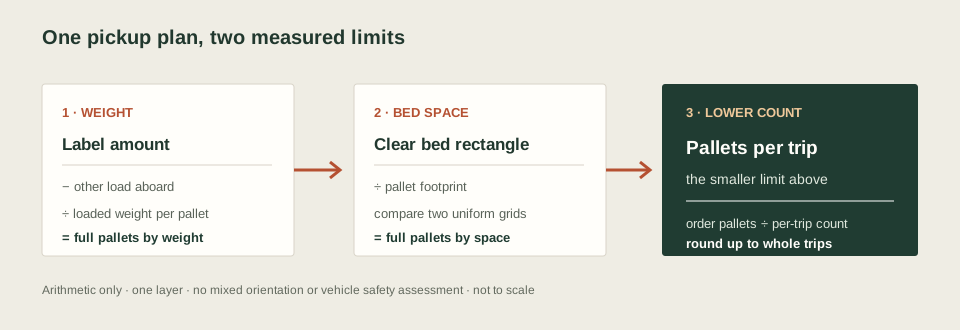
How the trip count works
The payload check subtracts people and other cargo from the combined amount you enter from the vehicle label. It then divides the remainder by the loaded weight of one complete pallet. The space check compares two rectangular grids: every pallet in the entered orientation, or every pallet turned 90 degrees. The smaller count is the arithmetic number for one trip.
Remaining amount = max(0, label amount − occupants and other cargo)
Pallets by weight = floor(remaining amount ÷ loaded weight per pallet)
Pallets by space = larger of the two uniform-orientation grids
Pallets per trip = min(pallets by weight, pallets by space)
Trips = ceiling(order pallets ÷ pallets per trip)
This bounded grid does not find every possible arrangement. It does not mix orientations, model an irregular bed, include overhang or plan stacked layers.
Use measurements for this pickup
- Read the combined occupants-and-cargo amount from the label for your exact vehicle.
- Count people and other cargo already aboard once, in the same weight unit.
- Use the loaded weight of one whole pallet, including its skid. A bag count or bag volume does not establish that weight.
- Measure the clear inside bed rectangle and the pallet's outside footprint in the same length unit.
The label field follows the combined occupants-and-cargo wording described in NHTSA's vehicle-label interpretation. This calculator only uses the values you enter; it does not verify the label or vehicle ratings.
Mulch pallet pickup questions
How many mulch pallets can I pick up per trip?
Enter the pallet count for your order, the combined occupants-and-cargo amount from your vehicle label, occupants and other cargo already aboard, the loaded weight of one full pallet, the clear bed rectangle and the pallet footprint. The lower of the payload and two uniform-orientation grid counts sets the arithmetic pallets per trip; the order count is rounded up to trips. This is not a safe-load clearance.
Should pallet weight include the skid?
Yes. Enter the weight of one complete loaded pallet as it will be carried, including its pallet or skid. Use a supplier figure for the exact product or a measured value; the calculator does not infer it from bag count.
Can I mix pallet orientations in the bed?
No. The space check compares two grids with every pallet in the same orientation. It does not optimize mixed orientations, irregular bed shapes, overhang or stacked layers.
Does a trip result mean the load is safe?
No. The page only performs arithmetic on your entries. It does not check axle, tire, suspension, weight distribution, visibility, overhang, cargo securement, road conditions, vehicle modifications or stacking. Follow the instructions and ratings for your exact vehicle and product.
Order count and pickup count are separate
Use the mulch pallet calculator to convert a bag requirement into whole pallets or a pallet-plus-loose-bag order. This page starts with full pallets already on the order. For loose individual bags, use the bag pickup capacity calculator; it measures bags rather than pallet footprints. For a loose bulk-material pickup, use the mulch load calculator.