Keep the estimate auditable
Each row shows its own volume contribution, and the largest contributor is marked. You can compare that subtotal with your field measurement instead of relying on a single unexplained total.
Bag coverage (ft²) = bag volume (ft³) × 12 ÷ depth (in). Enter measured areas and your bag-label volume for total volume and whole bags.
Play area? Use depth from the exact product’s current test/installation documents. Quantity only—not performance or compliance. See checklist.
Area formulas use the dimensions in your selected unit system: rectangle = length × width; circle = π × diameter² ÷ 4; ring = π × (outer diameter² − inner diameter²) ÷ 4; triangle = base × height ÷ 2. Known-area rows use the area you enter.
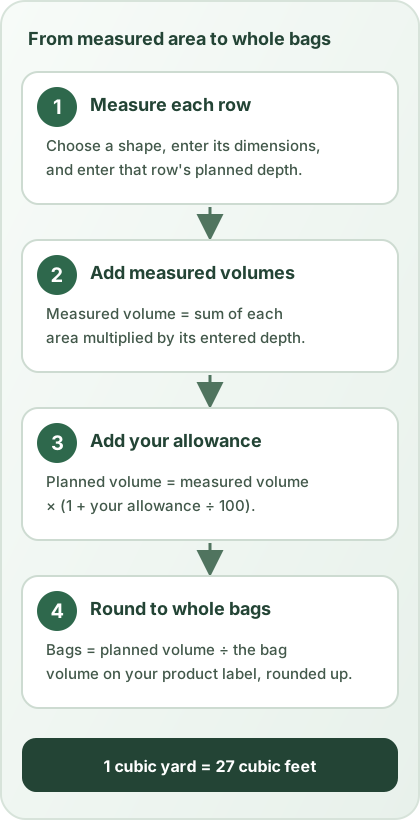
Transparent volume math
Choose feet and inches or metres and centimetres, then add a row for each measured area. Each row uses one shape and one depth; quantity repeats that same row. The calculator totals complete rows, shows each row's volume contribution, and marks the largest contributor.
Use the diagram to choose the shape, then enter the measurements shown by its label.
A hypothetical 12 ft × 5 ft area at a user-chosen 3 in depth needs 15 ft³: 12 × 5 × 3 ÷ 12. If the bag label says 0.8 ft³, each bag covers 3.2 ft² at that depth before allowance: 0.8 × 12 ÷ 3.
Choosing a 10% allowance makes the plan 16.5 ft³. Round 16.5 ÷ 0.8 up to 21 bags, which contain 16.8 ft³. The 0.3 ft³ above the plan comes from whole-bag rounding, not measured leftovers after installation.
These are example inputs, not a recommended depth, standard bag size or required allowance. Use your own measurements and product label.
Each row shows its own volume contribution, and the largest contributor is marked. You can compare that subtotal with your field measurement instead of relying on a single unexplained total.
Bag volume, bag price, bulk price and delivery are user-entered. The calculator does not select a generic product size, local price, coverage rate or installation depth.
The allowance is your chosen planning input. The extra volume created when bags round up is shown separately; neither line claims to be the amount left after installation.
These are unit conversions, not recommended application depths. One inch equals 2.54 centimetres; divide centimetres by 2.54 to convert back to inches.
| Inches | Centimetres |
|---|---|
| 1 | 2.54 |
| 2 | 5.08 |
| 3 | 7.62 |
| 4 | 10.16 |
| 6 | 15.24 |
| 8 | 20.32 |
| 12 | 30.48 |
Product questions need product evidence
Some rubber ground-cover products use recycled tire-derived crumb; product composition and instructions vary. Check the package and manufacturer documentation for the exact material you are buying. A calculator can help estimate quantity for a measured landscaping area, but it cannot decide whether a product fits a particular site or use.
If the project is a play area, do not treat a landscaping quantity estimate as proof of playground-surfacing performance. Look for product-specific test and installation information for the intended use. The U.S. Environmental Protection Agency’s tire-crumb exposure characterization work describes research on recycled tire crumb rubber and potential exposure pathways in fields and playgrounds; it is not a blanket safety conclusion for every product or residential application. The U.S. Consumer Product Safety Commission’s playground handbook addresses playground-specific protective surfacing and product information; its guidance should not be generalized into a recommended depth for landscaping.
The CPSC Public Playground Safety Handbook, Publication 325, July 2025 discusses surfacing in §2.4 and loose-fill materials in §2.4.2.2. For playground rubber mulch, it identifies ASTM F3012 and ASTM F1292 testing. Check the exact product, not just a bag labeled “rubber mulch.”
Have the equipment's fall height and use-zone layout established separately, then enter the confirmed dimensions and depth only to calculate quantity. This page does not derive those safety inputs, interpret test compliance or certify an installed surface. Filling in every field does not change that limit.
Cleaning instructions and service life are product-specific. The public references below do not establish one cleaning method or lifespan for every rubber mulch product, so follow the current manufacturer instructions and do not infer a service-life promise from this volume estimate.
Common questions
In US units, multiply each area's square feet by its depth in inches and divide by 12 for cubic feet. Add the row volumes, then apply only the allowance you choose. Enter the bag-label volume to round the planned amount up to whole bags.
Yes. Add a row for each rectangle, circle, ring, triangle or known area. Enter the dimensions and depth for each row.
Enter the volume printed on the product bag. The calculator divides planned cubic feet by that bag volume and rounds up to whole bags.
For square feet per bag, multiply its cubic-foot label volume by 12 and divide by the entered depth in inches. The calculator also shows square metres per bag with metric dimensions. Coverage is before any optional allowance; actual spread can vary by product and installation.
No. Enter the depth from your own plan or product documentation. The calculator does not recommend a depth.
Measured volume comes from the area and depth you enter. Planned volume adds only the separate allowance percentage you choose.
No. Quantity math does not certify product performance. Review product-specific test information and the public guidance for the intended use.
Yes. Each row has its own depth. Quantity repeats that row's shape, dimensions and depth; add another row when those inputs differ. Incomplete rows are excluded from the total and identified in the estimate status.
Some rubber ground-cover products use recycled tire-derived crumb, but composition varies. Check the package and current manufacturer documentation for the product you are buying.
Cleaning and service life are product-specific. Follow the manufacturer's current maintenance, replacement and disposal instructions; this calculator does not promise a service life.
No. This free calculator runs locally in your browser and does not require an account.
Primary references