Mulch calculator / Compare purchase routes
Bulk vs Bags Mulch Cost Calculator
Two real quotes, one measured project. See the amount you must actually buy before choosing a purchase route.
For this order
Worked example — replace every sample price and term with your supplier's quote.
Bags cost 28.50 less in this example.
| Bulk order | Delivery fee + tax | Total |
|---|---|---|
| Smallest sufficient— | — | — |
| At fee waiver— | — | — |
Amounts use the same currency you enter. Separate tax is not added unless you enter exact amounts from the quotes.
Measured job
Start with the total including any allowance you already chose. Do not add it again here.
Need this number? Measure beds with the mulch calculator, then bring its cubic-foot result here.
Bagged offer
Read the printed volume and current price from the same suitable product.
Bulk offer
Use the supplier's stated price format. Do not assume a half-yard costs half the whole-yard price.
Compare only the quantity and total actually offered. Enter 0 for the additional fee if delivery is included in that total. No price, minimum or fee waiver for another quantity is inferred.
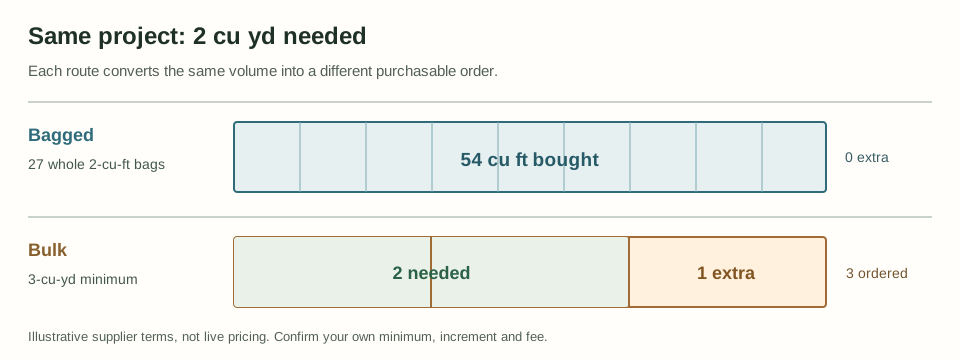
What this worksheet compares
It turns your measured cubic feet into purchasable orders. Bags are rounded up to a whole count. In per-yard mode, bulk volume is rounded up to the supplier's stated increment after applying its stated minimum. Each route adds only its own entered fee. The result compares those totals in one currency, not an advertised unit price or a national average.
When you enable a quoted fee waiver in per-yard mode, the worksheet also rounds the waiver threshold up to a valid bulk increment. It compares that order with the smallest sufficient bulk order, applies a zero bulk fee only at or above the threshold, and shows both totals and extra volume. A tie keeps the smaller order. Extra material, storage and disposal can still make the lower quoted total unsuitable.
For a total quote, enter the exact bulk quantity and material total offered, then any additional route fee. The worksheet compares that complete offer with the whole bags needed for your plan and shows the surplus. It will not scale the quoted price up or down, infer another purchase increment, or apply a fee waiver. An offer too small for the measured plan cannot be compared as a complete purchase route.
Compare quotes on the same tax basis. You may enter exact tax amounts copied from the quotes for the bag order, smallest sufficient bulk order and, when enabled, the fee-waiver order. If you enter tax for any compared order, fill the tax field for every compared order; use 0 when the supplier quote shows no tax. The worksheet adds those exact amounts and never estimates a tax rate. If tax is already included in an entered price, do not add it again. Leave all tax fields blank to compare the amounts and fees you entered without adding separate tax lines.
The tool does not know stock, coupons, volume discounts, unloading, labor, driveway access or supplier surcharges. If a quote already includes delivery, enter 0 for that route's additional fee to avoid double-counting. The optional per-yard mode models a full fee waiver at one volume threshold, not tiered delivery prices or per-product combined orders. For other pricing rules, get the supplier's total quote for a sufficient quantity.
For the 54 cu ft worked example, 27 × 2-cu-ft bags at 4.50 each cost 121.50 with no bag fee. The 2-cu-yd requirement becomes a 3-cu-yd bulk order under the example minimum, so 3 × 35 plus a 45 fee totals 150.00. Without that minimum, the example bulk total would be 115.00; the decision reverses. These are illustrative entries, not current store prices.
Check the measurement and the quote
Working backward from a spending cap instead? Use the mulch budget coverage calculator to estimate how many whole bags fit and the theoretical area their volume covers.
Iowa State University Extension explains the area × depth volume calculation and buying by stated bag volume. The Home Depot's mulch guide distinguishes bulk cubic-yard purchasing from bagged cubic-foot purchasing and directs buyers to check local delivery terms. These sources support the units and the need to check a supplier; they do not supply this example's prices or guarantee any local minimum.
D&D Mulch's delivery FAQ, checked October 1, 2026, is a concrete example of a per-product fee waiver: a smaller amount is available with a trucking charge, while the waiver requires enough of each product separately. That rule differs from a hard minimum purchase. Do not import this supplier's terms into another quote or combine products to reach its threshold.
Need to compare several loose-mulch quotes priced by each supplier's own scoop size? Use the mulch scoop price comparison calculator; it keeps each seller's capacity, order step, minimum and fee separate. Have one written line-item quote and want to check quantity × rate against the printed material subtotal? Use the mulch quote check calculator. Need to fill the gap between bulk increments with whole bags? Use the bulk + bags order worksheet. Already comparing two bag offers without bulk? Use the bag choice calculator. Quoting installation labor too? Use the installation cost worksheet. Need to check where a bulk pile can be dropped? Use the delivery space calculator. Have enough quote detail to compare delivered material with pickup and hauling costs? Use the delivery vs self-haul worksheet; this is separate from the bagged-versus-bulk purchase comparison above.
Sky Nursery's bulk pricing page, checked October 3, 2026, lists separate whole-yard and half-yard prices for bark and mulch; the half-yard prices are not simply half the whole-yard prices. This supports checking the actual quantity-specific offer, not assuming a universal pricing rule. No supplier price is prefilled from that page.
Considering one bulk load for two nearby households? Use the shared delivery cost split worksheet to compare each person's payment with separate delivered quotes after checking the supplier's two-address policy.
If handling is part of the decision, compare loaded wheelbarrow trips for each bed using its bulk volume or labeled bag count, the printed bag volume and your usable volume per load with the mulch wheelbarrow trip calculator. It estimates trip counts only; it does not assess hand-carry effort, driveway access, labor time or a safe load weight.
Purchase questions
Should I compare the price per cubic yard or the full order?
Compare the full order for your measured job. Whole bags, a bulk minimum and each route's fee can change which quote costs less.
What if my supplier has no bulk minimum?
Enter 0 for the minimum and enter the supplier's actual order increment. The calculator still rounds the required bulk volume up to that increment.
Does a lower total mean the materials are interchangeable?
No. This is a volume and entered-price comparison only. Confirm that both materials suit the same location and that delivery, tax and handling terms are comparable before ordering.
Is a free-delivery threshold the same as a minimum order?
No. A minimum order is the least you may buy. A fee-waiver threshold is the volume that removes a delivery charge, and smaller orders may still be available with a fee. Enter each quoted rule in its own field.
Should I buy extra mulch to get free delivery?
Compare the extra material cost with the fee removed. Enable the quoted waiver to see both bulk totals and the surplus. A lower total is not a reason to buy material you cannot use or store.
What if a half-yard price is not half the whole-yard price?
Choose Total for a stated quantity, then enter the exact bulk quantity and total offered. Add only fees not already included. The offer must cover your measured plan; the calculator does not infer a price or fee waiver for a different quantity.
Can this compare sales tax?
It can add exact tax amounts copied from the supplier's quotes, but it does not estimate a tax rate. Leave every tax field blank to compare the amounts you entered, or fill every tax field for the orders being compared. If tax is already included in an entered price, do not add it again.